
A small apartment does not need a spare room to hold a real office. It needs a defined zone, furniture that earns its floor space, and a setup you can close at the end of the day. Get those three things right and a corner of a living room or a stretch of bedroom wall can carry a full workday without swallowing the home around it.
This guide covers the whole setup, from choosing the spot to handling noise, storage, light, and the line between work and rest. It is written for renters and owners working with limited square footage.
Start With the Work, Not the Furniture
Before measuring for a desk, list what the work actually requires. A laptop and a notebook need far less than a dual monitor setup with a printer, a microphone, and reference books. Write down the equipment that must stay out all day, the items used once or twice a week, and the things that only appear for video calls. That short list decides the desk size, the storage, and the power plan.
Most people find that a clear desk matters more than a large one. A surface crowded with chargers, papers, and coffee cups feels cramped even when the room itself is fine. A desk that holds only the active work, with everything else parked within arm’s reach, keeps a small zone calm.
Measure the candidate spot before shopping. Tape the desk footprint on the floor, sit in the chair, and check that you can push back, stand up, and walk past without turning sideways. A common mistake is buying the desk first and discovering that the chair needs another 30 inches (76 cm) of clearance behind it. The tape test takes ten minutes and saves a return.
Pick Your Zone: Five Spots That Actually Work
Not every corner suits a desk. Light, noise, outlets, and foot traffic matter as much as floor area. Walk the apartment at the hours you normally work and notice where the light falls and where people pass through. The best zone is often the second choice on first glance, because the obvious spot beside the sofa usually sits in the middle of everything.
The Living Room Corner

A living room corner gives the most daylight and the easiest access to outlets, and it keeps the bedroom free for rest. Face the desk toward the room rather than into the corner when possible, so the wall does not close in around the screen. A rug under the desk and chair marks the zone, and a low bookshelf set at a right angle to the wall can act as a soft divider without blocking light.
The risk here is that work never leaves the room where you relax. A folding screen, a curtain on a ceiling track, or a desk that folds shut can draw the line at the end of the day. If the desk faces the sofa, video calls will show the living room behind you, so check the background before the first meeting.
The Bedroom Wall
A bedroom office works when the desk sits on a different wall from the bed, ideally near the window and away from the headboard. That separation helps the brain treat one side of the room as work and the other as rest. Keep the desk narrow, 40 to 48 inches (102 to 122 cm) wide for most laptop and single monitor setups, and leave the bed clear of papers and chargers.
Sleep suffers when the desk glows beside the bed all evening, so a lamp with a warm setting and a habit of closing the laptop lid both help. Most people sleep better when the work zone goes dark with the rest of the room.
The Closet Office, or Cloffice
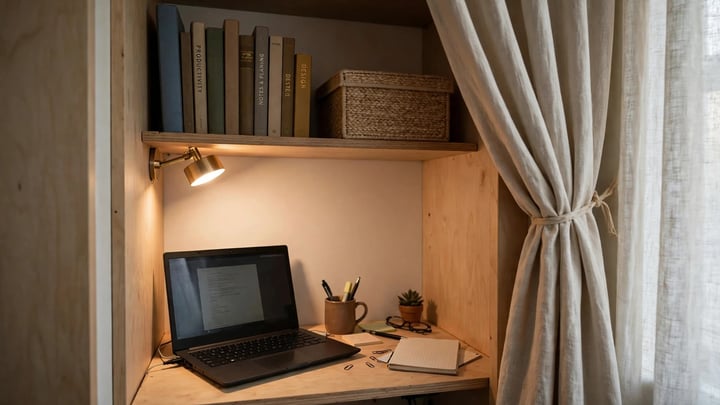
A closet with a width of at least 36 inches (91 cm) can hold a compact desk, a shelf above, and a task lamp, and the doors or a curtain can hide the whole setup after hours. Remove the doors only if the lease allows it, and check the depth first. Many closets are about 24 inches (61 cm) deep, which fits a laptop but leaves little room for a monitor arm or a keyboard tray.
Ventilation is the weak point. A closed closet traps warm air from a laptop and a lamp, and the space can feel stuffy within an hour. Leave the doors open while working, and keep paper and fabric away from the lamp. If the closet holds the only storage in the apartment, weigh the trade carefully before giving it up to a desk.
Still measuring for the desk? Our guide to how to choose the right desk size for your home office walks through the widths and depths that fit real setups.
If you want more layout ideas for tight rooms, see our collection of 20 small home office ideas for spaces of every shape.
Choosing between desk styles? Our roundup of home office desk ideas compares the setups that work best in small rooms.
Sitting all day in a chair that does not fit will wear you out, so read our guide to the best ergonomic office chairs of 2026 before you buy.
Good light changes everything in a small zone, and our home office lighting ideas cover task lamps, placement, and glare control.
If the only spare wall is in the bedroom, our guide to small home office ideas for bedrooms shows how to keep work and sleep apart in one room.
The Hallway, Alcove, or Underused Nook
Hallways and alcoves near a window often sit empty, and a wall mounted desk can turn them into a work zone without taking floor space from any room. A fold down desk works well here because it disappears when the workday ends. Add a shelf above for books and a hook for headphones, and the nook becomes a complete station in about 18 inches (46 cm) of depth.
The catch is traffic. If the nook sits on the path to the bathroom or the kitchen, every trip past the desk breaks concentration. Measure the walkway and keep at least 30 inches (76 cm) clear beside the chair. If that is not possible, the nook suits short focused sessions better than an eight hour day.
The Dining Table, Done Deliberately
A dining table can serve as a desk, but only with a clear start and stop. Keep work supplies in a single caddy or rolling cart that lives beside the table, set it up in the morning, and pack it away before dinner. Without that ritual, papers spread across the table, meals move to the sofa, and the apartment starts to feel like an office that happens to have a kitchen.
A laptop stand and a separate keyboard help here more than anywhere else, because dining chairs rarely offer the support of a task chair. A firm cushion can close some of the gap, though it does not replace a chair with adjustable height and back support for long days.
Make the Zone Feel Separate Without Building Walls

A small apartment rarely allows a new wall, and most leases forbid one. Separation in a studio or one bedroom home comes from visual cues, sound control, and routine rather than construction. The goal is a zone that feels like work when you sit down and fades into the apartment when you stand up.
A rug is the simplest marker. Choose one large enough to hold the desk legs and the chair, with a low pile that lets the chair roll. A change in wall color behind the desk or a different lamp can do the same job. Stepping onto the rug becomes the start of the workday, and stepping off it becomes the end.
Open shelving placed at a right angle to the wall divides a room without blocking daylight. Keep the shelves low enough to see over, around 48 to 54 inches (122 to 137 cm) high, so the room still feels open. A tall closed bookcase in the same spot can make a small apartment feel cut in half.
Curtains offer the most flexible boundary. A ceiling mounted track or a tension rod across an alcove lets you close the office during calls and open it afterward. Choose a fabric that filters light rather than blocking it, and keep the curtain clear of the lamp and any heater. For renters, removable hooks and tension rods avoid holes in the wall, though they hold less weight than a screwed in track.
Sound matters as much as sight. A rug, curtains, and upholstered furniture absorb echo, and a small apartment with hard floors and bare walls can sound harsh on calls. Closed back headphones handle most video meetings, and a fan can soften sounds from the hallway or the street. If the desk sits near the front door, a draft stopper under the door cuts both noise and cold air.
Choose Furniture That Earns Its Footprint
Every piece in a small office should do at least two jobs or fold away. A desk that only holds a laptop wastes the wall above it and the floor below it, and a chair that cannot tuck under the desk steals walkway space all day. Judge each piece by what it gives back when the workday ends.
The Desk

Desk size follows the equipment list from the first section. A laptop only setup fits on a surface 36 to 42 inches (91 to 107 cm) wide and 20 to 24 inches (51 to 61 cm) deep. Add a single monitor and the width should grow to at least 48 inches (122 cm), with 24 to 30 inches (61 to 76 cm) of depth so the screen sits far enough from your eyes. Dual monitors usually need 55 inches (140 cm) or more, which is a lot of wall in a small apartment, so consider a single ultrawide monitor or a laptop plus one external screen instead.
Wall mounted and fold down desks save the most floor space. A floating desk leaves the floor visible underneath, which makes the room feel larger, and a fold down model frees the wall entirely after hours. Ladder desks combine a small surface with shelves above, and they suit light laptop work. A full L shaped desk gives the most surface, but it also claims a corner permanently, so it fits better in a one bedroom apartment with a dedicated nook than in a studio.
Check the desk height as well. A typical seated desk height is 28 to 30 inches (71 to 76 cm), a widely used planning range, and a chair with adjustable height can bridge small differences. If the desk is too high, shoulders rise toward the ears by mid afternoon, and the ache that follows is easy to mistake for a bad chair. A keyboard tray can lower the typing surface by a few inches on a desk that is otherwise too tall.
Wondering whether a sit stand desk is worth the floor space? Our comparison of standing desk vs sitting desk lays out the trade offs for home offices.
The Chair
The chair deserves the largest share of the budget in a small office, because it is the piece your body touches all day. Look for adjustable seat height, a backrest that supports the lower back, and armrests that slide under the desk or flip up. A chair with flip up arms tucks fully under the desk, which can save a foot of floor space in a tight zone.
If a full task chair will not fit, a compact ergonomic chair with a smaller base can work for shorter sessions. Be honest about how long you sit. A chair that feels fine for a two hour session can become a problem across a full workweek, and back pain is a high price for a saved square foot. Test the chair in person when possible, and sit in it for at least ten minutes before deciding.
Multi Use and Folding Pieces
A storage ottoman can hold cables and notebooks and serve as a footrest or extra seat. A rolling cart with three tiers can hold a printer on top, files in the middle, and supplies below, then roll into a closet at night. A desk with a drawer or a modesty panel hides clutter from the room, which matters when the office shares space with guests.
Folding furniture has limits. A folding desk that wobbles will shake the monitor with every keystroke, and a folding chair that digs into the thighs will not survive a long call. Check stability before buying, and prefer pieces with a locking mechanism. The best folding setup is one you actually fold, so the mechanism should take seconds.
Set Up Ergonomics in a Tight Footprint
A small desk does not excuse a strained neck. The same posture rules apply in a closet office as in a corporate one, and they matter more when the space tempts you to perch on a sofa or hunch over a laptop on a low table. The U.S. Occupational Safety and Health Administration (OSHA) Computer Workstations eTool gives the clearest free reference for home setups, and its guidance is simple enough to apply in a few minutes.
Place the top of the monitor at or slightly below eye level, with the screen about an arm’s length away. OSHA puts the viewing distance at 20 to 40 inches (51 to 102 cm), measured from the eyes to the screen. A laptop on the desk sits too low for long sessions, so a laptop stand plus a separate keyboard and mouse is the single most useful ergonomic purchase for small apartments. It costs less than a new chair and fixes the neck angle immediately.
Elbows should rest at about 90 to 120 degrees while typing, with wrists straight and shoulders relaxed, following the neutral posture in the OSHA Computer Workstations eTool. If the desk is fixed at one height and the chair cannot adjust enough, a footrest can raise the feet so the knees sit level. Check the setup after a full hour of work rather than after five minutes. Discomfort that appears slowly is the kind that turns into a habit.
Light deserves the same attention. The Canadian Centre for Occupational Health and Safety (CCOHS) lists 75 to 300 lux for computer tasks and 200 to 500 lux for reading good quality print, measured at the desk surface. A phone lux meter app gives a rough reading. If the screen glares or the page sits in shadow, move the lamp or the desk. Place the monitor perpendicular to the window so daylight falls across the desk rather than straight into the screen or into your eyes, and use a blind or sheer curtain to soften direct sun.
Take movement seriously in a small space. Stand up every hour, stretch, and walk to the kitchen or the window. A small apartment makes this easy, since everything is a few steps away. A standing desk converter can help, but it needs a deep desk and a stable base, so test it with the monitor on before committing.
Storage Without a Filing Cabinet
Storage is where small offices fail most often. Papers, cables, chargers, and reference books have nowhere to go, so they pile on the desk, and the pile becomes the reason the zone feels messy. The fix is to sort by frequency, not by category. Items used every day stay within arm’s reach. Items used weekly live on a shelf or in a drawer nearby. Everything else belongs in a closet, a box under the bed, or out of the apartment entirely.
Go vertical first. Two or three floating shelves above the desk hold books, boxes, and a small plant without touching the floor. Mount the lowest shelf high enough to clear the monitor, usually 18 to 20 inches (46 to 51 cm) above the desk surface, and keep heavy books on the lower shelf. Anchor shelves into studs when the wall allows it, and use rated drywall anchors when it does not.
A pegboard above the desk can hold headphones, cables, scissors, and small baskets in plain sight, which suits people who lose things inside drawers. A wall file organizer keeps active papers visible without a stack on the desk. Closed storage suits the rest. A lidded box on a shelf hides printer paper and spare cables, and a drawer divider keeps chargers from tangling into a single knot.
Rolling storage earns its place in a small apartment because it moves. A slim rolling cart beside the desk can hold the printer, and it slides into a closet or under a table after hours. A file pedestal on wheels fits under many desks and pulls out only when needed. Under desk storage works when it stays shallow. A deep drawer under a small desk steals legroom, and legroom is already scarce.
Cables deserve a plan of their own. A cable tray under the desk and a short power strip mounted to the desk leg keep the floor clear and the setup safe. Keep the power strip off the floor where a spill or a foot can reach it, and leave slack in the cables so the laptop can move without pulling the strip.
Light, Sound, and Air

A small office can feel bright and calm or dim and airless depending on three choices: where the desk sits relative to the window, what kind of lamp lights the desk, and whether air moves through the zone. Get these right and the space feels larger than its measurements suggest.
Natural light is the best asset a small apartment office has. A desk near a window gets daylight for most of the working day, and the view gives the eyes a place to rest during calls. The trade is glare and heat. A sheer curtain or a blind softens both without darkening the room, and a monitor placed perpendicular to the window avoids the worst reflections.
Artificial light should layer. A ceiling light alone leaves the desk in shadow from your own body, so add a task lamp with an adjustable arm and a warm to neutral color temperature, around 2700 to 4000K for most home work. A monitor light bar can light the desk without taking surface space, which helps on a shallow desk.
Sound control in a small apartment is mostly about soft surfaces. A rug under the desk, curtains on the window, and a fabric chair absorb echo that hard floors and bare walls bounce around. If calls echo, try a rug and a curtain before buying acoustic panels. For noise from outside, a fan can mask street sound, and closed back headphones keep calls private in a shared apartment.
Air matters more in a closet office or a nook than in a living room corner. A laptop, a lamp, and a person in a small enclosed space raise the temperature quickly, and stale air makes concentration harder. Leave doors open while working, crack a window when the weather allows, and keep the desk away from radiators and heaters. A small fan can move air without taking floor space, and it doubles as white noise during calls.
Power, Internet, and Cables
A home office needs more outlets than a small apartment usually offers near one wall. Count the devices that need power at the same time: laptop, monitor, lamp, phone charger, and possibly a printer or a speaker. If the count exceeds the outlets, add a surge protected power strip rather than a string of adapters. Mount the strip to the desk or the wall so it stays off the floor and within reach.
Internet reliability matters more than speed for most video calls. If the desk sits far from the router, test the connection at the desk before moving furniture. A wired connection through an Ethernet cable gives the most stable calls, and a flat cable can run along a baseboard without tripping anyone. Keep a phone hotspot as a backup for important meetings, and test it once before relying on it.
Plan cable routes before the desk goes against the wall. Leave a gap of two to three inches (5 to 8 cm) behind the desk for cables and a power strip, and use adhesive clips to guide cables along the desk leg rather than letting them hang. Label the chargers if several devices share the strip, so unplugging the right one does not become a guessing game.
Daily Routines That Keep Work From Taking Over
Furniture sets the stage, but routine keeps the boundary. In a small apartment, work spreads easily because there is nowhere for it to go at 6 p.m. A short shutdown ritual closes the day: clear the desk, close the laptop, put papers in their box, and turn off the task lamp. The physical act of closing the setup tells the rest of the evening that work is done, and the next morning starts clean instead of starting in yesterday’s clutter.
Set working hours and keep them visible. A shared calendar helps housemates and family know when not to interrupt, and it helps you stop answering messages after hours. If the office shares a bedroom, change clothes after work or move to a different chair for the evening. The change sounds small, but it breaks the feeling that the workday never ends.
Clean the zone once a week. Wipe the desk, file or recycle the papers that piled up, and check that the chair still rolls freely. A ten minute reset on a Friday afternoon keeps the office from slowly turning into a storage shelf.
What to Buy First, What to Skip, and What It Costs
Start with the pieces that fix posture and light, then add storage and decoration. A laptop stand, a separate keyboard and mouse, and a task lamp usually cost less together than a single premium chair, and they improve a full day of work immediately. A good chair comes next, followed by shelves and a rolling cart. Decoration comes last.
Costs vary widely by region, material, and whether pieces are new or secondhand, so treat any single price as a snapshot rather than a rule. As a typical range, a compact desk can run from about $80 to $400, a task chair from about $100 to $500, and a laptop stand plus keyboard and mouse from about $50 to $200, with prices varying by region and material. Secondhand desks and chairs can cut those numbers substantially, and they suit renters who may move within a year. Check the return policy before buying a chair online, since comfort is hard to judge from a photo.
Skip the extras until the basics work. A second monitor, a printer, and a standing desk converter all help, but none of them fixes a desk that is too small or a chair that hurts. A printer in particular eats space in a small apartment, and a nearby print shop or library can cover occasional printing. Buy one only when weekly printing makes the trip a real burden.
Conclusion
Setting up a home office in a small apartment has a simple shape: claim a small zone, fill it with furniture that folds or stores, set the screen and chair to fit your body, and close the setup at the end of the day. The apartment does not need to grow. It needs a boundary that holds, a desk that stays clear, and a chair that lets you sit through a workday without aching.
The proof comes at five o’clock. Close the laptop, fold the desk away or slide the chair in, and switch the work lamp off. If the corner goes quiet and the room feels like a home again, the setup works. Buy the stand, the keyboard, and the lamp first. Add the chair, the shelves, and the cart once the basics work. The result is not a showroom office. It is a corner of a real apartment that works hard from nine to five and then steps aside, so the home can be a home again.





Leave a Reply
You must be logged in to post a comment.